Forums › Forums › Fungi ID requests (post here if you aren’t sure what type of fungus you’ve found) › Unidentified Fungi Object (UFO)
- This topic is empty.
-
AuthorPosts
-
June 7, 2015 at 9:22 am #29448
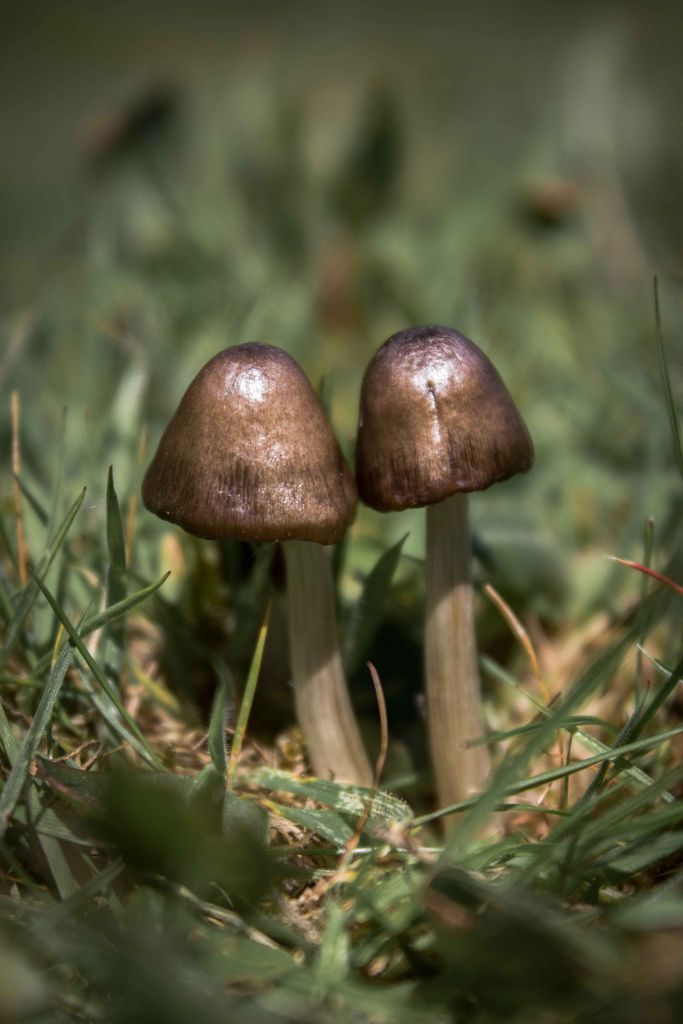
[attachment=2]IMG_2686-low.jpg[/attachment] Observed 26th May on moorland heath.
I returned to the same spot 24 hours later and they were as good as gone.
Possibly Entoloma genus?
***Mike (Lancashire Lad)… I have used save for web feature for the photo’s and sized them to less than 400kb — hopefully they display for you now?
June 7, 2015 at 3:11 pm #34878Hi, I’m still getting the small black box with white X inside when trying to view the first image – but I can view the second and third images.
Did you use a different method of uploading those two?
(In your post, they are showing inside a white “attachments” box, whereas the first image isn’t).
Regards,
Mike.
June 7, 2015 at 3:54 pm #34879I pressed the “place inline” button for the first pic which appeared to place it before the text. I didn’t do this for the others. I resized the images to less than 400kb but did not change the actual size dimensions to make them smaller – perhaps this is the problem?
(I am not at my desktop to test this theory presently but will do this later)
June 7, 2015 at 4:09 pm #34880dubrae wrote:I pressed the “place inline” button for the first pic which appeared to place it before the text. I didn’t do this for the others.
I resized the images to less than 400kb but did not change the actual size dimensions to make them smaller – perhaps this is the problem?
(I am not at my desktop to test this theory presently but will do this later)
Very strange that this problem only occurs for me with your images. – With others being able to view them without problem.I always use the “place inline” button to place my images in posts – but you have to make sure that your cursor is at the correct spot – as “place inline” puts the top left corner of the image wherever the cursor is.
In future, it might be better to do whatever you did for the final two images (as long as you can place them where they need to be within your posts) as I can see them at full size when clicked on.
Alternatively though, as you suggest, it may be best to resize the images by altering the pixel dimensions rather than other means. – I always try to resize my photos to 1250 pixels on the longest side (which usually gives about 800-850 pixels on the shorter side) before uploading.
Regards,
Mike.
PS: without an idea of spore size & shape, I wouldn’t like to hazard a guess for species of this fungus.
June 7, 2015 at 4:39 pm #34881How about now?! – I DO shoot in the highest possible resolution and in RAW format. I then save as JPEG. I have resized these (in pixels) as per your suggestion. Am very much a beginner (in mycology, not photography) .. I’ve read the recent thread about microscopes and have my eyes peeled (pun intended) for one, possibly the Apex Researcher.
At the same time as learning, the spore photography I have seen on here is fabulous!
June 7, 2015 at 5:20 pm #34882Success! 
I can now click on, and see all three of the above resized images at their full size!
I appreciate your efforts in sticking with this to overcome the problem – many wouldn’t have done so.
I too shoot at best resolution for the camera, which obviously results in large file sizes – far too big for general internet forum use.
I always do some post camera image editing, even if it’s just cropping, sharpening, and adding my copyright logo – so once that’s done, I take the opportunity to create a small 1250 pixel version of anything that’s going to be uploaded. Just a matter of a few mouse-clicks.
It never fails to surprise me though, that many people find image resizing impossible, or too much of a chore to be bothered with – and then usually complaining that it’s the website that is at fault.
So it’s good to see someone go the extra mile to sort a problem out.
Regards,
Mike.
June 7, 2015 at 5:26 pm #34883
I am the type that cannot leave a problem unsolved… Guess that’s a good trait to have the field of fungi identification
😆 Thank you for the heads up, will adopt this technique in the future now, so it works both ways
June 7, 2015 at 10:05 pm #34884Without a microscope, a spore print can help, as an Entoloma should leave a pink one (usually more of a light brown, but there is a hint of pink, more of a salmon pink) Its likely to be a microscopy job in any case, I’m afraid, although someone more knowledgable might suggest something  June 8, 2015 at 8:14 am #34885
For sure an Entoloma, and in ‘old money’ a Nolanea (now a Sub Genus of Entoloma). The ‘default setting’ is E. conferendum: the most common species of this Sub-Genus found in grassland but also woodland and more or less everywhere. Quite easy to identify with a microscope with it’s distinctive spores. If it’s not that, it’ll be fairly difficult with specialist literature required (as well as a microscope!). June 8, 2015 at 8:33 pm #34886Thanks for the input everyone, appreciate it -
AuthorPosts


- You must be logged in to reply to this topic.